
One astronaut cat, one quiet discovery
Cosmic Cat is an astronaut cat AI video template for a new five-second scene. The cat video template supplies a starting brief; you can change the setting, appearance and movement. It produces a rendered clip, without an editable 3D world or multi-shot timeline.
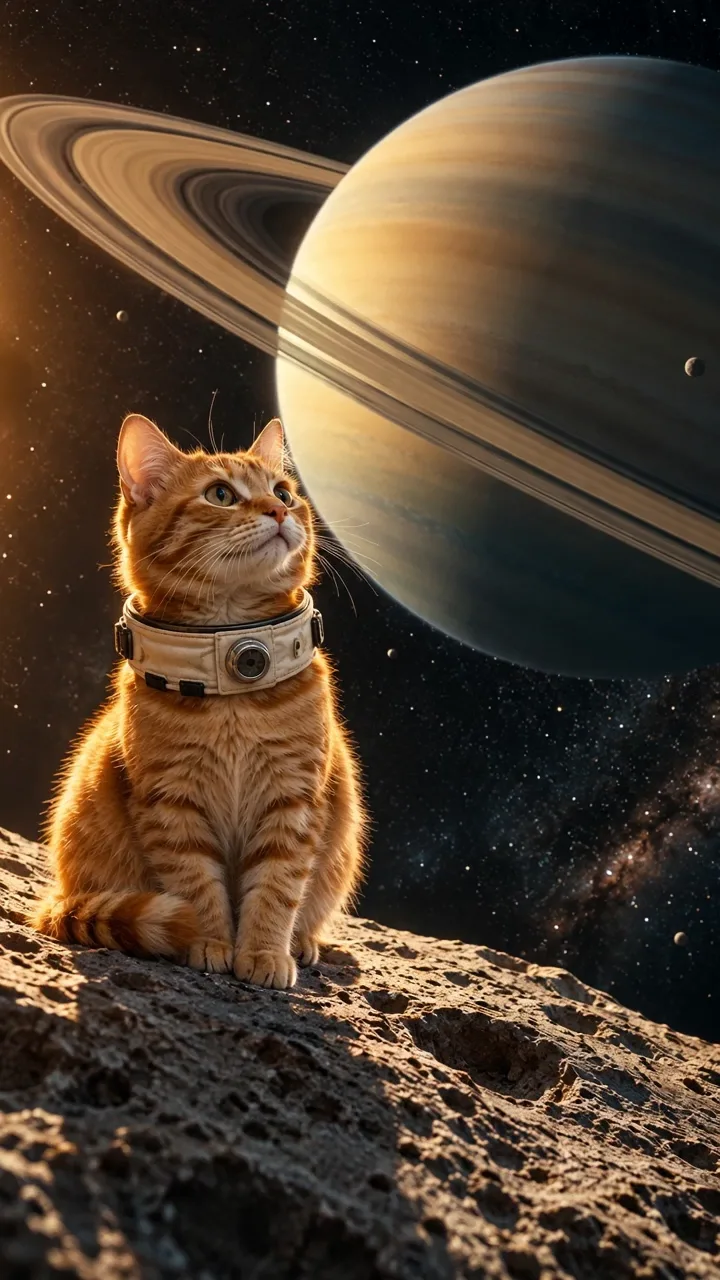
The original sample shows an orange astronaut cat looking toward Saturn. It used an image reference and requested a slow head tilt, twitching ears and a gentle camera push. The published file is 720 × 1280, approximately five seconds, with no audio track. It demonstrates one generated result, not a text-only test or a promise to preserve your pet.
For astronaut-cat character ideas, PhilRe’s EpicMegaJam: Spacecat model is a specific example of a cat designed for a game-jam project, with rigging and animation noted by its creator. Decide on the suit silhouette before adding movement to your space cat video brief.
Make Patel’s Cosmic Whiskers logo study describes a simplified cat face inside a helmet, emphasizing eyes and whiskers. For your clip, ask for a clear face inside the visor and inspect whether reflections obscure those features.
michiaki yasuda’s Astronaut Cat -Spaceship illustration places a helmeted cat among a ringed planet, stars and colorful space motifs. Use the subject–planet relationship as a composition idea, then simplify the scene to one cat, one planet and one small action.
For a different space cat video, adapt this brief in the workspace:
An astronaut cat rests on a moon rock beneath a ringed planet. The cat slowly raises its chin, ears twitching once. Keep the paws planted, the planet visible and the camera nearly still. One continuous shot, no text.
This is an editable example, not the original production prompt. Scene suggestion buttons append text; remove conflicting movements before generating.
Choose what guides your space cat video
Use text alone for an invented astronaut cat. Add a pet photo to guide appearance or a reference video to suggest movement. These choices guide a new render; they do not edit the uploaded footage in place.
- Text only
- Subject, setting and requested action.
- One cat, one planet and one small movement.
- Pet photo
- The first frame when used alone; appearance when paired with video.
- One clear cat, visible ears and face, room around the head.
- Reference video
- Movement for a newly generated scene.
- A slow look upward, without rapid cuts or overlapping animals.
A pet photo must be static JPEG, PNG or WebP, at most 10 MiB, at least 300 pixels on each side and at most 36 million pixels. A reference video must be MP4 or MOV, at most 20 MiB and at most 4096 pixels per side. Basic accepts references from 2 to 15 seconds and Pro accepts 2 to 30 seconds. You can combine multiple images and one video. Upload only authorized media; remove unrelated people or private background details first.
Cosmic Cat generates a five-second clip with either model. Basic supports 480p and 720p, and Pro also supports 1080p. Text and video modes offer 9:16, 16:9 or 1:1; a pet photo used alone uses adaptive framing. Native Audio starts enabled and can be turned off. The silent sample does not determine your new task’s audio setting.
Runway’s image-to-video guide separates appearance from motion instructions. For a pet photo, inspect the face and helmet area, then describe the slow head turn in your brief.
Create and check your astronaut cat
- Edit the brief. Use the workspace above to describe your astronaut cat and a single action. Leave space for both the helmet and the planet’s rings; avoid a launch, landing and head turn in one short shot.
- Add optional media. Choose Add Media for a pet photo or reference video; sign in if asked. Desktop users can choose Send Photo/Video; received media follows the normal validation and replacement flow. Check the accepted preview. Adding media does not start generation.
- Set the output. Choose resolution, available framing and Native Audio. For an image-only space cat video, inspect the adaptive crop after generation. Higher resolution does not guarantee stable markings or anatomy.
- Review the credits. Review the displayed credits, then choose Generate Video to start; sign in if prompted. The estimate updates with your settings and reference media. Reference-video duration rounds up to the next second for billing. See the video credit guide.
- Inspect and save. Watch the astronaut cat’s eyes, fur, paws and suit through the whole clip. Check the rings, crop and soundtrack, then use Download to Computer or Save to Phone on desktop. Mobile users select media and download directly. If disconnected, check the original task in My Videos before retrying. Downloading does not publish it.
Why choose the Cosmic Cat template?
Choose this cat video template when a visible space scene and an editable starting brief help you begin. Text, a pet photo and a reference video give you different ways to guide the same short shot. You can inspect the sample before uploading and review a quote before committing credits.
The tradeoff is a fixed length and variable likeness, motion and detail. It suits a small moment of curiosity, rather than a finished space adventure. For another setting or a longer shot, use the AI cat video generator; for this scene, edit your astronaut cat brief.
Questions before generating
Choose the right workflow
What does the Cosmic Cat AI video template make?
Cosmic Cat generates a five-second astronaut-cat scene from an editable starting brief. It creates a new rendered shot, not a playable space game or a 3D character asset.
Do I need an astronaut-cat image or a 3D model first?
No. Start with the astronaut-cat brief or use an ordinary authorized cat photo to guide appearance. Describe the suit, planet and one action; the generator creates a new scene, so helmet shape, paws and costume details still need review.
Do I need a photo or a reference video?
Start with text, optionally add up to 9 photos with Basic or 30 with Pro, plus one reference video. A single image without video guides the first frame; multiple photos provide visual references. With a video, photos guide appearance while the video guides motion.
Can I change the astronaut cat, planet or camera movement?
Yes. Edit the starting prompt and optionally add a reference before generating. Keep one clear action; scene-hint buttons add text to your brief, so remove conflicting instructions before submitting.
Will the result exactly match my reference?
No exact match is guaranteed. Appearance, motion, lettering and audio can vary. Start with a clear source and one simple action, then inspect the entire finished clip before sharing or buying another attempt.
Prepare and generate
Which duration, resolution and aspect ratio can I choose?
This scene template fixes the output at five seconds. Basic offers 480p/720p; Pro adds 1080p. A single image without video uses an adaptive ratio; other supported modes offer ratio choices. A longer reference does not lengthen the result.
Can I generate sound or upload my own song?
Native audio requests generated sound; turning it off requests silence. General tools have no separate song upload, exact voice matching, precise lip sync or beat mapping. Add licensed music and precise speech in an editor after download. Original reference soundtracks are not guaranteed, and there is no exported audio-mix or volume editor.
Can I generate a batch or a complete multi-shot film?
Each submission creates one short clip; there is no batch or automatic multi-shot assembly control. Generate separate shots and edit them together; each generation has its own quote and character continuity can vary.
Accounts, credits and task status
How much will one generation cost?
The creation area shows the current quote. Tier, output length, resolution and reference-video duration affect it; prepared template references can also count. Recheck the total after changing settings. Video Credit Guide
Save, share and protect your media
Where can I find and download my finished video?
Open the completed task in the creation area or My Videos, play the result and use Download. Save your own copy for later editing or posting. Samples are examples, not your personal task output. The download is an MP4 file. My Videos
Sources
-
PhilRe: EpicMegaJam: Spacecat on Sketchfab — Astronaut-cat character project with creator notes on rigging and animation.
-
Make Patel: Cosmic Whiskers on Dribbble — Helmeted-cat logo study explaining eyes, whiskers and simplified shapes.
-
michiaki yasuda: Astronaut Cat -Spaceship on Dribbble — Illustration combining an astronaut cat with a ringed planet and space motifs.
-
YouTube Help: disclosing use of GenAI content — Learn when to label AI-generated visuals and audio on YouTube.