
Create one original moment for a short
This AI YouTube Shorts generator creates one new short clip from text, a photo, a reference video, or an image and video together. Use it for a visual opening, an imagined scene or a sound-led experiment. Preview and download the short clip for a separate upload.
A reference video guides new imagery; it does not extract the best moments from a recording. Use a clipping editor for that job. This Shorts generator produces a rendered clip, rather than a multi-scene story with editable narration and captions.
Watch and listen to the glass-fruit example
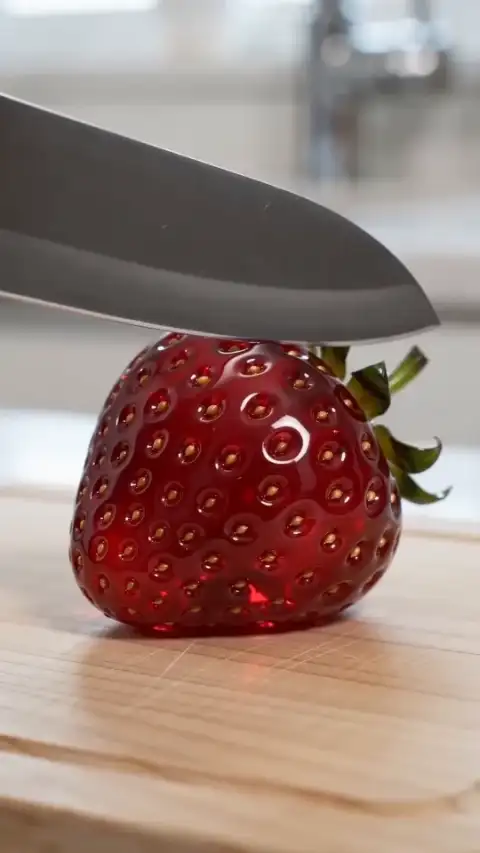
The sample shows an impossible translucent strawberry being sliced on a board. It is a surreal visual, not a recording of edible fruit. Inspect the short clip and its sound before generating. The adapted brief is not the sample's original prompt or a reproduction guarantee.
YouTube Shorts · A visual guide only. Platform controls and crops vary; check the final upload. The guide is not included in your video.
Vertical macro shot of an impossible ruby-red glass strawberry on a pale wooden board. One adult hand makes a single slow cut; a translucent slice tips away. Fixed camera, bright daylight, one continuous action. Delicate crystal scraping and a light tap, no music, speech, text or logos.
- Picture: follow the hand, blade and separating slice. Check whether contact and movement remain coherent throughout the short clip, including its final frame.
- Sound: unmute the player and listen for scraping, chimes or unwanted speech. Check timing and volume; requesting an effect does not guarantee an exact sound or mix.
The composition guide helps inspect a vertical video. It is a preview overlay, not YouTube's interface or a fixed safe-area specification, and is not included in your downloaded clip.
Prepare the input and choose what should move
Write 3–2,000 characters describing one subject, action, setting and camera direction. Keep one complete movement in your short clip. Request the sound separately in your description and review what is actually generated.
A single image alone guides the first frame and uses an adaptive ratio. With a reference video, an optional image guides appearance while the video guides movement. Neither guarantees unchanged faces, labels or frames. For a vertical video, select 9:16 where available; with a single image alone, start with portrait framing and inspect the result.
Use static JPEG/PNG/WebP images up to 10 MiB, at least 300 pixels per side and at most 36 megapixels. An MP4/MOV reference video needs a video track, must be at most 20 MiB and 4,096 pixels per side, and last 2–15 seconds for Basic or 2–30 for Pro. Trim longer footage first. If a media link cannot import, use an authorized local file.
Generate and save your short clip
- Add the brief and references. Use text alone, reference images, one reference video or both. Wait for media validation. On desktop you can receive a photo or video from your phone; receiving it does not start generation.
- Check settings. Basic requests 4–15 seconds at 480p/720p; Pro requests 4–30 seconds and adds 1080p. Check the ratio for your vertical video and choose whether to generate native audio.
- Review the credits. Review the displayed credits, then select Generate Video to start; sign in if prompted. Model, output duration, resolution and reference-video duration affect the estimate, which updates as you change your inputs or settings. See the video credit guide.
- Inspect and download. Follow the original task in My videos, including after a lost connection. Watch the full short clip with sound and on mute, then download it or send it to your phone. YouTube upload is a separate step.
Why choose this Shorts generator?
Choose this AI YouTube Shorts generator when you need one new visual shot whose movement and sound you can review together. Start your short clip through text input, or guide the scene with a photo or reference video. The playable sample lets you judge whether this kind of short clip suits your idea before checking a quote.
Use an editor for exact cuts, captions, replacing an audio track or joining several shots. The Shorts generator does not offer those controls or publish to your channel. Start by adapting the glass-fruit brief, keeping one action you can inspect.
Check format, rights and AI disclosure before upload
YouTube's computer upload guidance accepts square or vertical video files up to three minutes. This Shorts generator requests 4–30 seconds by tier; the platform limit does not extend a generation. The same guidance requires permission for protected material in externally made Shorts. Generating or downloading a short clip does not establish rights or publication approval.
YouTube's AI disclosure guidance requires disclosure for realistic generated or meaningfully altered content and generated music that is the video's main focus. It distinguishes non-realistic content and minor edits. Calling a scene ASMR, or omitting speech, is not enough to decide. Review the finished picture and audio, then answer “AI use” under Attributes where applicable. AI disclosure does not clear music rights or select an audience.
Check task status before trying again
Confirmed failure, or confirmed cancellation without a usable result, returns task credits. A short clip you dislike or a dropped connection is not automatically a failure. Returned credits keep their original expiry; expired credits remain unavailable, and cash refunds can affect reconciliation. Read the refund policy.
Submit authorized references. Files have restricted account access by default, but accessible storage URLs can expose them; review the privacy policy before sensitive uploads.
Shorts preview and publishing questions
Choose the right workflow
What is an AI YouTube Shorts generator?
The AI YouTube Shorts generator creates a short visual scene with optional generated sound. It does not automatically extract highlights from a long recording or publish to YouTube.
Do I need a photo or a reference video?
Start with text, optionally add up to 9 photos with Basic or 30 with Pro, plus one reference video. A single image without video guides the first frame; multiple photos provide visual references. With a video, photos guide appearance while the video guides motion.
Prepare and generate
How do I keep important subjects and captions away from platform overlays?
Use the preview’s composition guide to review framing, keep important content away from the edges, and add precise captions in an editor. The guide is not exported and is not an exact copy of every platform layout; inspect the real upload preview too.
Can I control the background, camera and exact action timing?
Describe a background, one action and a camera move in the prompt. These guide a new scene rather than lock pixels or timestamps. There are no masking, subject-isolation or per-second motion controls, so check the entire result.
Which duration, resolution and aspect ratio can I choose?
Basic offers 4–15 seconds at 480p/720p; Pro offers 4–30 seconds and adds 1080p. The interface offers portrait, landscape and square choices where applicable. A single image without video uses an adaptive ratio; multiple images offer ratio choices.
Prepare and generate
Can I generate a batch or a complete multi-shot film?
Each submission creates one short clip; there is no batch or automatic multi-shot assembly control. Generate separate shots and edit them together; each generation has its own quote and character continuity can vary.
Can I generate sound or upload my own song?
Native audio requests generated sound; turning it off requests silence. General tools have no separate song upload, exact voice matching, precise lip sync or beat mapping. Add licensed music and precise speech in an editor after download. Original reference soundtracks are not guaranteed, and there is no exported audio-mix or volume editor.
Accounts, credits and task status
How much will one generation cost?
The creation area shows the current quote. Tier, output length, resolution and reference-video duration affect it; prepared template references can also count. Recheck the total after changing settings. Video Credit Guide
Save, share and protect your media
Can I add captions, trim clips or edit individual frames here?
This workflow generates a rendered clip, not an editable timeline, layered project or 3D model. Download it to trim, assemble scenes, add exact text or adjust individual details in a suitable editor.
Do I need to label the video as AI-generated when posting?
It can be required for realistic generated or meaningfully altered scenes. YouTube also requires disclosure when generated music is the main focus. Set the disclosure yourself during upload and check each platform’s current rules; downloading here does not set it for you. Check YouTube’s disclosure examples.
Sources
- YouTube: upload Shorts — format, duration and protected material.
- YouTube: disclose GenAI content — disclosure conditions and settings.
- YouTube: set the audience — channel and video audience settings.