Create one new clip for a reel
An AI Instagram Reels generator creates one Reels video from a text brief, a photo, or a reference video. A reference video guides a new interpretation; it does not extract highlights from the original recording. The Instagram Reels generator delivers a rendered clip to review and download. Editing several shots and publishing happen separately.
Prepare the scene and choose your inputs
Describe one subject, action, setting and camera movement in 3–2,000 characters. For a Reels video, plan where the viewer should look before adding detail. Keep faces and instruments away from the frame edges; camera movement can change their position.
Start with text alone, reference images, one reference video, or both. A single image alone guides the first frame and uses an adaptive ratio. With a reference video present, the image can guide appearance while the video guides movement. Neither locks every face, label or frame. For a vertical Reels video, choose 9:16 where available; with a single image alone, prepare a portrait composition and inspect the actual output.
Images must be static JPEG, PNG or WebP, at most 10 MiB, at least 300 pixels per side and no more than 36 megapixels. A reference video must be MP4/MOV with a video track, at most 20 MiB and 4,096 pixels per side. Basic accepts 2–15 seconds of reference video; Pro accepts 2–30 seconds. Trim longer footage first. If a public media link cannot import, use an authorized local file.
Generate, check and download
- Prepare the brief. Describe one continuous action. Add optional media and wait for validation. On desktop, the phone-transfer button can receive your photo or video; selecting it does not start generation.
- Set the output. Basic requests 4–15 seconds at 480p/720p; Pro requests 4–30 seconds at 480p/720p/1080p. Check ratio and sound settings. Resolution is not a frame-rate setting.
- Review the credits. Review the displayed credits, then select Generate Video to start; sign in if prompted. Model, output duration, resolution and reference-video duration affect the estimate, which updates as you change your inputs or settings. See the video credit guide.
- Review the Reels video. Follow the original task in My videos, including after a connection interruption. Watch the full Reels video and check sound, faces and movement. Download the clip or send it to your phone. Review the cover frame separately, then upload through Instagram yourself.
Try a cover frame from the office jam sample
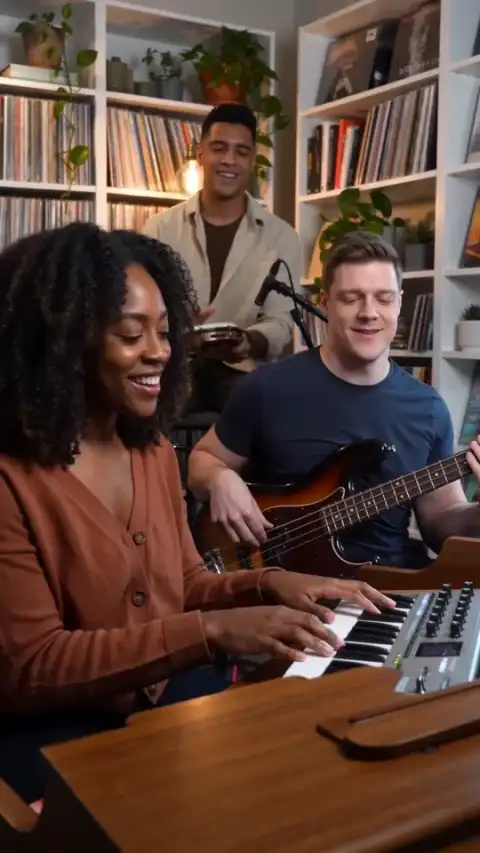
The example shows three fictional friends playing keyboard, bass and hand drum. The brief below is an editable adaptation of that scene, not a guarantee of reproducing the sample. Try the preview before spending credits on your own Reels video.
Instagram Reels · A visual guide only. Platform controls and crops vary; check the final upload. The guide is not included in your video.
Vertical home-office jam: three fictional adult friends play keyboard, bass and hand drum. Warm desk-lamp light, slow push toward the keyboard player, one continuous shot. Keep faces and instruments clear of the edges; no text or logos. Original instrumental groove, no existing melody or vocals.
Play the preview to load it, pause, then move the cover-frame slider to a clear moment. Select the cover frame and download the PNG. The Reels cover uses the video's native pixel dimensions; it does not add a title, resize the image or change the clip. The composition guide is a viewing aid, not Instagram's interface, and is not written into the PNG or video.
For your completed result, choose a cover frame where the subject is recognizable without motion. Check the Reels cover in Instagram's available posting previews; matching the video's dimensions does not guarantee the same crop everywhere.
Why choose this Instagram Reels generator?
Choose this AI Instagram Reels generator when you are missing one original visual shot and want a cover frame from that Reels video. Text-only input lets you start without footage; photo and reference-video modes give you different ways to guide appearance and movement. Reviewing the clip and extracting a still in one place helps you choose a Reels cover that actually represents the scene.
Use an editor for multi-shot assembly, exact captions, logos or song timing. The Instagram Reels generator does not provide those controls, trend analytics or scheduled posting. Start by adapting the office-jam brief, then check the quote before generating.
Check your Reels video before posting
Meta's Reels size and resolution guidance specifies at least 720 pixels and 30 fps. The gallery sample is 24 fps. Inspect your downloaded Reels video; selecting 720p or saving a cover frame does not convert its frame rate. Re-export separately if needed and check playback again. Check the upload preview in Instagram before publishing.
For a non-ad Reel, Meta requires disclosure when digitally created or altered video looks real or audio sounds real. Check both parts of the export using Meta’s Instagram AI disclosure guidance, including any generated voice or music.
Review audio, rights and task status
Generated sound does not license a commercial song or synchronize the Reels video to a track you chose elsewhere. Meta's music-library guidance distinguishes personal, non-commercial library use from Sound Collection options and notes account/region restrictions. Verify permissions for your intended use, including promotion.
Confirmed failure, or confirmed cancellation without a usable result, returns task credits. Disliking a result or losing connection is not automatically a failure. Returned credits keep their original expiry; expired credits remain unavailable, and cash refunds can affect reconciliation. Check the refund policy before retrying. Submit authorized media only. Files have restricted account access by default, but an accessible storage URL can expose them; review the privacy policy before sensitive uploads.
Reels cover questions
Choose the right workflow
What is an AI Instagram Reels generator?
The AI Instagram Reels generator makes a new short clip and offers a cover-frame preview. You download the video and any chosen cover, then finish posting in Instagram.
Do I need a photo or a reference video?
Start with text, optionally add up to 9 photos with Basic or 30 with Pro, plus one reference video. A single image without video guides the first frame; multiple photos provide visual references. With a video, photos guide appearance while the video guides motion.
Can I download a cover image for my reel?
Yes. Load and pause a supported preview, choose a frame and download the cover as PNG. Composition guides are not included. This does not set the cover or publish inside Instagram for you.
Will the result exactly match my reference?
No exact match is guaranteed. Appearance, motion, lettering and audio can vary. Start with a clear source and one simple action, then inspect the entire finished clip before sharing or buying another attempt.
Prepare and generate
How do I keep important subjects and captions away from platform overlays?
Use the preview’s composition guide to review framing, keep important content away from the edges, and add precise captions in an editor. The guide is not exported and is not an exact copy of every platform layout; inspect the real upload preview too.
Prepare and generate
Which duration, resolution and aspect ratio can I choose?
Basic offers 4–15 seconds at 480p/720p; Pro offers 4–30 seconds and adds 1080p. The interface offers portrait, landscape and square choices where applicable. A single image without video uses an adaptive ratio; multiple images offer ratio choices.
Can I generate sound or upload my own song?
Native audio requests generated sound; turning it off requests silence. General tools have no separate song upload, exact voice matching, precise lip sync or beat mapping. Add licensed music and precise speech in an editor after download. Original reference soundtracks are not guaranteed, and there is no exported audio-mix or volume editor.
Accounts, credits and task status
How much will one generation cost?
The creation area shows the current quote. Tier, output length, resolution and reference-video duration affect it; prepared template references can also count. Recheck the total after changing settings. Video Credit Guide
Save, share and protect your media
Can I add captions, trim clips or edit individual frames here?
This workflow generates a rendered clip, not an editable timeline, layered project or 3D model. Download it to trim, assemble scenes, add exact text or adjust individual details in a suitable editor.
Where can I find and download my finished video?
Open the completed task in the creation area or My Videos, play the result and use Download. Save your own copy for later editing or posting. Samples are examples, not your personal task output. The download is an MP4 file. My Videos
Sources
-
Meta: Reels size and resolution — video upload specifications; check the actual file.
-
Meta: Instagram licensed music library — library scope, restrictions and Sound Collection options.