Choose where your dance begins
Viral Video AI's AI dance generator creates a new short clip from a written idea, with an optional photo, reference video or both. Add up to one of each: the photo can guide appearance while the video guides movement. The result does not guarantee exact choreography or identity.
- Start with words. Describe the dancer, setting, and dance steps.
- Start with a photo. An image used alone is sent as a first-frame reference; paired with a video, it guides appearance. Use a dance prompt to describe the movement; faces and clothing can still change.
- Start with a video. One owned clip guides a new dance video, not an edit of the original.
For fixed flash-step styles, preview the Shan Shen Bu AI Dance template.
Prepare the movement you want to show
For a dance video with image input, prepare one single-frame JPEG, PNG, or WebP up to 10 MiB. Each dimension must be at least 300 pixels, with at most 36 million pixels total. Use a clear full-body photo for dance steps that need visible hands, knees, and feet.
A video reference must be MP4 or MOV, up to 20 MiB: 2–15 seconds for Basic, 2–30 for Pro. Trim longer recordings first; reference and output limits differ. Reference videos must contain a video track and be no more than 4,096 pixels per side.
Choose Add media, sign in when asked, and wait for validation. Check the accepted reference before writing a dance prompt; selecting a file does not generate a dance video.
Give the dancer room
Framing diagram: keep hands, knees and feet visible. Use a small movement that fits the available space.
Give the movement room to happen
Write a dance prompt for one readable action, such as a side step, pause, and return. Enter 3–2,000 characters, matching the visible pose and space.
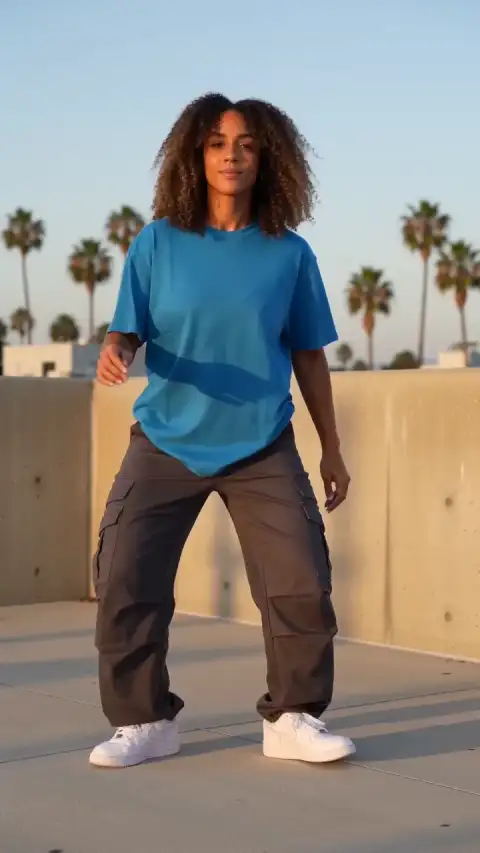
- Side steps: try a fixed frontal camera; keep feet and floor visible, with room beside the dancer in the full-body photo.
- Close-up: choose a smaller action; cropped feet cannot be checked.
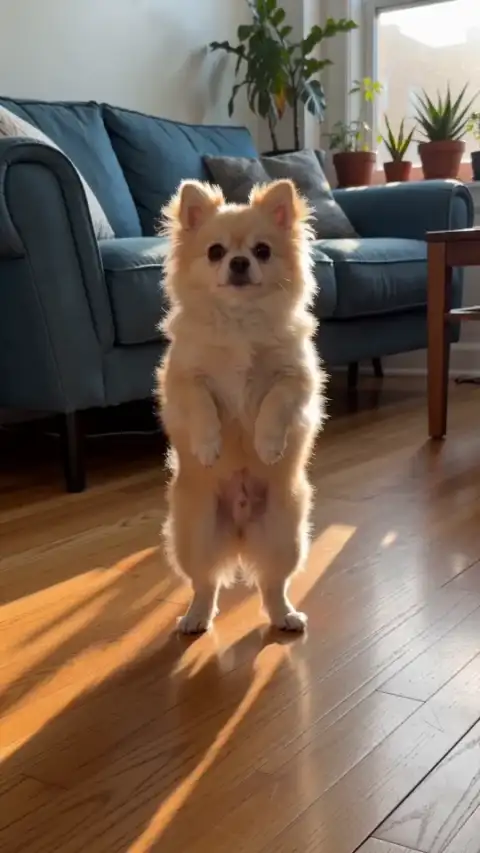
- A pet: choose dance steps suited to the animal, without human hands or shoes.
ComfyUI's Kling Motion Control guide recommends visible limbs and room around the subject for its image-plus-video workflow.
This adult dance prompt is separate from the pet demonstration below:
One fictional adult dancer wearing an unbranded blue tee, charcoal cargo pants and white sneakers performs small alternating heel-toe steps, a light side shuffle and a relaxed shoulder groove on a sunlit rooftop. Original freestyle, natural arms and realistic foot contact. Fixed frontal full-body phone camera, hands and both feet visible throughout, one continuous shot. No celebrity likeness, recognizable choreography, extra limbs, cuts, text or logos.
Why choose this AI dance generator for a flexible brief?
Choose this AI dance generator for an original performance you can describe in one shot. Adapt the rooftop dance prompt for a human subject or inspect the silent pet example for a different kind of movement. The composer shows duration, resolution, and the credit quote beside your brief. Plan one attempt and inspect it before paying for another.
For a preset routine, try the flash-step template above. Trend discovery and song-based choreography need a separate workflow. Start with your own dance prompt.
Review the quote, then make your dance video
- Choose the output. Basic offers 4–15 seconds at 480p or 720p. Pro offers 4–30 seconds and adds 1080p. For an image used alone, the interface shows an adaptive ratio; video references, including those paired with a photo, offer ratio choices. Check the finished framing. Native audio requests generated sound, without uploading a chosen song or mapping dance steps to its beat.
- Review the credits. Review the displayed credits, then select Generate Video to start; sign in if prompted. Model, output duration, resolution and reference-video duration affect the estimate, which updates as you change your inputs or settings. See the video credit guide.
- Inspect and download. Play the dance video and audio; check the dance steps against your brief and source. Download a usable result for editing or sharing; publishing is separate.
Check the dance video from feet to frame
Pause the dance video at foot contact: does a planted shoe slide relative to the floor? Compare the face and clothing before and after turns. Check hands, limb count, and framing; for pets, inspect paws and balance.
If dance steps become unclear, simplify the action or use a clearer full-body photo. Change one part of the dance prompt at a time. Another generation has a new quote; it does not repair existing frames.
The silent Living-room pet dance uses a different brief from the adult dance prompt. Its prompt button replaces your current text.
Before retrying or sharing
If generation fails, or cancellation is confirmed without a usable result, task credits return. Disliking the dance steps or losing the connection does not automatically establish failure. Check the original task before creating another dance video. Cash refunds are a separate process; read the refund and credit return policy. Returned credits keep their original expiry; expired credits remain unavailable. If the purchase funding the task was refunded in cash, the credit return may be reconciled against that refund.
Use authorized photos, footage and music, with permission from identifiable people shown. Product access is restricted to your account by default; accessible storage URLs can expose files. Providers process generation inputs. Review the privacy policy before submitting sensitive media.
For a business dance post, choose added music within the scope of the TikTok commercial music library. Label realistic AI performances as required by TikTok’s AI labeling guidance. Review the exported dance and soundtrack before posting.
Dance video questions
Choose the right workflow
What is an AI dance generator?
This AI dance generator creates a new short performance from a dance brief and optional reference media. It guides movement rather than guaranteeing a frame-for-frame routine.
Do I need a photo or a reference video?
Start with text, optionally add up to 9 photos with Basic or 30 with Pro, plus one reference video. A single image without video guides the first frame; multiple photos provide visual references. With a video, photos guide appearance while the video guides motion.
Can I animate both people and pets dancing?
You can describe either subject. Use a clear full-body reference when available and adapt the motion to the subject; pets should not be expected to copy human anatomy or choreography exactly.
Will the result exactly match my reference?
No exact match is guaranteed. Appearance, motion, lettering and audio can vary. Start with a clear source and one simple action, then inspect the entire finished clip before sharing or buying another attempt.
Prepare and generate
Will a selfie or head-only photo work for full-body motion?
A cropped image cannot reliably supply unseen limbs or clothing. For whole-body movement, choose a sharp full-body photo with visible hands or paws and space around the subject; results can still vary.
Prepare and generate
Can I control the background, camera and exact action timing?
Describe a background, one action and a camera move in the prompt. These guide a new scene rather than lock pixels or timestamps. There are no masking, subject-isolation or per-second motion controls, so check the entire result.
Can I generate sound or upload my own song?
Native audio requests generated sound; turning it off requests silence. General tools have no separate song upload, exact voice matching, precise lip sync or beat mapping. Add licensed music and precise speech in an editor after download. Original reference soundtracks are not guaranteed, and there is no exported audio-mix or volume editor.
Which duration, resolution and aspect ratio can I choose?
Basic offers 4–15 seconds at 480p/720p; Pro offers 4–30 seconds and adds 1080p. The interface offers portrait, landscape and square choices where applicable. A single image without video uses an adaptive ratio; multiple images offer ratio choices.
Accounts, credits and task status
How much will one generation cost?
The creation area shows the current quote. Tier, output length, resolution and reference-video duration affect it; prepared template references can also count. Recheck the total after changing settings. Video Credit Guide
Save, share and protect your media
Where can I find and download my finished video?
Open the completed task in the creation area or My Videos, play the result and use Download. Save your own copy for later editing or posting. Samples are examples, not your personal task output. The download is an MP4 file. My Videos
Sources
Try a different scene
AI-generated example
Living-room pet dance
This is an original generated example, not a promised outcome. Use the suggested prompt as a starting point and review each new result independently.
Video Credit Guide